Saturday, August 29, 2020

Google Classroom Settings (and why they are important to your life)


Many school districts are using a Single Sign-On (SSO) platform to house all of their virtual learning. This is helpful because the kids (and parents) know to go to the same place every day to find their assignments. My district has chosen Google for Education for several years now, and I have used it in music classes as well. 

When creating your class in Google Classroom (GC), there are several settings you should pay attention to. Different settings can be found in two different places within GC.  Settings for one individual GC are found by clicking on the gear symbol in the top right corner. This covers settings unique to the class you are working in. 

  • Class details
  • Class code and invitation to join
  • Stream settings (who can post and comment)
  • Guardian summaries (to send or not to send)
  • Meet link (a permanent Google Meet link assigned to your class)
  • Grading settings 
In addition to these settings, there are more that apply to ALL of your classes in GC. To find those, click on the three lines (menu) symbol in the top left corner. Scroll alllll the way down to find Settings. Here you will find
  • Your Profile and Password information
  • Notifications --this is where to go if you are getting too many email notifications, or not enough. 
Before inviting students to join your class, take a minute to design your settings to fit your teaching style. The most important ones for me are Stream settings (I don't allow students to post or comment), the Meet link (keep it hidden until you are opening up a class meet), and Notifications (some people hate getting 47,000 emails a day). 

After helping several people find these settings, I decided to make a video showing how and where to access all of these.  To see a demonstration in my (dummy) class, along with more details about how and why I use mine, click on the video below: 


I hope you are finding success as you navigate the Google platform for your teaching this fall. I promise, it WILL get easier! 

Keep Singing,


Sunday, August 23, 2020

What I Learned in Our First Week of Virtual Learning

(and 8 Tips for Asynchronous Lessons in Google Classroom)


We just finished our first week of school, and I am cautiously optimistic! I don't want to jinx it, but it seemed to go pretty well, with only a few exceptions. 

My district is starting the year with virtual instruction for two weeks, then a "phase in" week where students are assigned a day to come on campus. This will give us smaller groups of students to train on the new procedures and expectations. Beginning September 8, all students who chose Face-to-Face learning will be on campus.  We had about 1/3 of our enrollment choose virtual learning for the first nine weeks, so our numbers on campus will be smaller. (My district required parents to choose one and stick with it for the first nine weeks--no hopping back and forth--which I think is brilliant.)

As far as Music and Specials lessons go, this is our first time to teach fully virtual.  Last spring, we were told not to overwhelm parents with too much stuff, so we only posted simple "suggestions" each week. Now we are creating lessons that are to be asynchronous, since we will also be teaching in person after week 3. 

So what did I do? I'm glad you asked! 

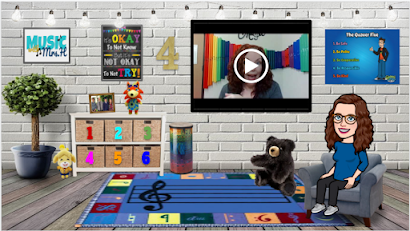
I created the popular Bitmoji Classrooms for each grade level--same template, different activities. I am really happy with the way they turned out, and I only had a couple of kids send me questions. 


I tried to make them as user friendly as possible. If you want to check them out, you can see the whole presentation HERE.  (Side note: On the second day of school, I stopped at a convenience store on my way to work. When I got to the counter, the clerk looked at me and said, "You look just like your Bitmoji!" Her kids go to my school. LOL!)

We are using Google Classroom to send assignments to students at all levels. We created one GC for Specials for each grade level. Within each GClassroom, we created Topics for each of our classes. At the top of the Stream is a post with directions for finding and completing their assignments. This is the first place we hit a bump. We forgot to turn off "Posts and Comments" for students, so as soon as 4th grade got on, they started posting "What do I do?", "How do we check in?", "Hi friend!", etc. [insert eyeroll here], sending the directions further and further down the stream. SO I jumped on and turned off commenting, deleted the useless posts, and moved the directions back to the top, answering credible questions with a referral to the directions post. 

The next morning, I decided to open a Google Meet to talk to 4th graders and give them the directions again. Since they are meeting their classroom teachers live, they thought they were going to see us, too. I explained again that they are to go into Specials GC and do one lesson each day. 

Day 3, I still had kids asking where the code was to join the meet. [another eyeroll] 

Here is where you have to let go. Students have to learn to do things for themselves. I have given them all of the directions they need (both written and audio recording). I will answer legitimate questions when they ask, but I am not going to spoon feed them everything. Virtual Learning may be just what they need to develop the confidence to do it themselves. 

Once we got past that first hour, everything settled down and went very smoothly! We got an occasional question, which we answered quickly and got most students sorted out. Other than wifi issues that I can't fix, I think everyone was able to complete their lessons so far. I have one more day to let them get to all of our classes, so I'll have a better count after Monday. 

Here are my tips for successful asynchronous music assignments through Google Classroom:

  1. In Google Classroom, turn off posts and comments for students when you set up your classes. They can still message you privately, but no one else sees their comments.
  2. Post general instructions at the top of the stream. Add audio or video instructions for struggling readers.
  3. Post all assignments under the "Classwork" tab. Create Topics to organize them over time. 
  4. Keep the first lesson simple. The goal for the first week is to learn how to navigate this new platform.
  5. Add audio or video instructions to your lesson if you can. I used the Google Extension "Simple Audio Recorder" and read the instructions out loud. If you're interested, I can write another post about that. 
  6. Provide an easy way to find out who completed the lesson. I added a Google Form with one question at the end of the lesson. "Which song was your favorite?" is an easy one. 
  7. Give yourself some grace. If they don't all get it the first week, make the next week the same with only a few changes (different songs or activities, but same look and instructions). 
  8. It's not going to be perfect, and that's okay. Teaching in person is not perfect, and we handle it every day. It just looks different now. Your kids will learn how to do this, and they will become more independent learners, which is what we want, right? Right! 
This is a learning curve for teachers too. We can do it. Ready or not, week two here we come! 

Have a fabulous day, friends!


Wednesday, July 8, 2020

Create Your Own App--with Google Sheets!


Have you ever wanted to learn how to create your own app? 

I always thought there was no way I could learn that. It was surely too hard and complicated for my life. I am here to tell you that is not true! If you can use Google Sheets, you can do this! I have used it to create apps for my Music Team, a Staff Directory for my campus, and even a documentation app for teachers to use as they are working with students. SO. COOL!

I recently presented a session about this at the TCEA Elementary Tech Conference last June. I made a few videos to demonstrate the app, so I thought I would share them here. There is also a handout to help you remember everything. So let's do this!

Let me introduce you to Glide. Here is an overview from the creators at Glide to show you how it works: 

Are you excited yet? I was! I started experimenting right away! One of the first apps I made was for our team of music teachers in the district. It included a directory of all of the teachers, a calendar of our monthly meetings, and a link to our shared library of resources. They loved it!

To create your own app, you will need to go to www.glideapps.com and create your account. Here is a video to walk you through the process: 


So, are you excited to try this out?  How can you see yourself using Glide in your own life or classroom? I would love to hear your ideas! Please share them in the comments! 

Go make something amazing!


Wednesday, July 1, 2020

Are You Going to QuaverCon?


Hello friends!  If you are looking for some summer PD hours, or if you need some more time to learn and work with Quaver materials, I hope you are planning to attend QuaverCon.  It is a Virtual Conference taking place on July 21-22, 2020. And......it's FREE!

Oh, and if you're already signed up for Artie and Denise's Online Odyssey on the same dates, have no fear! QuaverCon will be available to registered participants to view after the conference. You have nothing to lose, and EVERYTHING to gain!

Want to know more? CLICK HERE and read all about it on their website:

Award-winning Event Apps and Event Management Software | Whova


After you register, be sure to download the Whova Conference App and connect with everyone. The app is how you will gain access to the conference, but once you set up your login you can access it on your computer as well. 


I hope to see you there! Send me a "hello" in the app when you get there!


Monday, June 29, 2020

Quaver Teacher Ambassador Training 2019


Hello friends!  Sorry it's been so long!  The last couple of  years have been super busy, and I let blogging fall to the wayside. SO....I have a lot to share!  This post is about an amazing opportunity I was given last summer.  I have been a Quaver fangirl for a long time, and became the "resident expert" for my district. Thanks to my relationship with my Quaver rep, I was invited to attend a special three day training at Quaver Headquarters in Nashville to become a Quaver Teacher Ambassador!  Squeee!!!!

It was an AMAZING training, and further reinforced my belief in this company.  They are not here to make money. They are here to make learning FUN for kids and teachers. They work hard to give teachers what they need as quickly and professionally as they can. They fix problems when you call them. They are constantly adding and updating materials. They offer regular PD webinars to keep you up to date on all the features.  I could go on and on. Maybe that will be another post. 

Since we can't travel this year, I thought I'd share some memories of my time in Nashville. 


Quaver headquarters are housed in a...well, house. It's actually several houses in this area near Vanderbilt University.  We stopped to pose in front of the awning, and look who photobombed us--it's Gwenda!


Ever wondered what the infamous Maura Harwood looks like?  That's her on the right. She's Facebook famous! 


Btw, if you haven't joined the FB group for Quaver Teachers, do it now. It is a great PLN for Quaver users to share ideas and ask questions. Maura monitors the group and jumps in when needed to answer questions. She's the bomb!


Quick! To the  phone box! 


We got to tour the studios where the magic happens: artists, musicians, and of course the set of the Quaver Episodes. 


And I got to hang out with famous composers!


I could go on, but I don't want to bore you with all my photos. We heard from the artist who created the characters for You-Nique, creators working on amazing things for the future, and of course Otto Gross and his fantastic musicianship. There are SO MANY wonderful teachers and creators there who are dedicated to making music education the best they can for you--the teachers and students. 

I made a lot of new friends from around the country that I still keep in touch with online. The Quaver community is a wonderful network of people that I am honored to be a part of. Here's one last pic of your Texas Quaver Teacher Ambassadors:


Need Quaver help? Ask me! If I don't know, I can hook you up with someone who does.

See you later!


Sunday, September 9, 2018

Music and SpEd Accommodations

School has started, and all your kiddos are settled in their classes. You've found your teaching groove. Life is good!  Then comes the email from the Diag/SpEd Teacher:  You have ARD paperwork to sign!

I don't know about you, but this stresses me out a little.  Teaching every kid in the school means getting paperwork for every single student in SpEd, 504, Speech, Behavior Intervention, etc. That's a lot to keep up with!  I want the best for all of my students, but it's hard  for my ADD brain to remember who needs what in which class. So, I created my own Accommodations Tracking System.

I made a spreadsheet for each grade level with columns for accommodations. Each student has one line, with a check in the column that matches their ARD paperwork. After several years with this system, I have created a checklist with the most commonly applied accommodations for music (and other specialist classes).


This has turned out to be so much more helpful than I even imagined! Lesson plans, seating charts, and grading are easy to cross check  with a one page list. No more giant folders of paper on my desk, or in my inbox. [insert happy dance here]

I have made my Accommodations Tracking Sheets available in my TpT Store. They include my pre-filled charts that I use, plus a blank sheet to fill in if you prefer a different list. There are two empty columns on the list too, for those less common mods that pop up. You can find it HERE. If you like it, please take the time to leave a review on TpT as well. It will earn you points for future discounts!

I hope this can help you master the mayhem of SpEd paperwork!  Let me know what you think! 


Tuesday, July 31, 2018

Back to School SALE on TpT!


Hey guys!  Just a short post today to make sure you know that TpT is having a Back to School Sale! Save up to 25% on your favorite teaching resources on August 1st and 2nd. My entire store will be marked 20% off. Use the Code BTSFRESH at checkout to get a total of 25% off.

Time to check your wishlist and get some new material for the new school year! I hope you will check out my small store while you're there:  From Mayhem to Mastery

I have a feeling this will be your best year yet. I'm planning for it to be mine! After starting last year with a hurricane (Harvey took two weeks out) and all the mayhem that followed, I am positive this year will be more organized, more energized, and more joyful than the last. Less mayhem, more mastery, right?

May your coffee be strong, your shoes comfortable, and your voice clear and bright. Let's do this!


Sunday, July 8, 2018

A Little Shameless Self Promotion...

Hi friends! 

So I've been a fan of Teachers Pay Teachers for a long time. It's brilliant. Teachers can share the things they have spent hours creating --and that work for them-- and maybe even make a little money on the side. I'm also a fan of not re-inventing the wheel for every lesson. It's amazing what you can find if you just search Google, YouTube, and TpT!

That said, I also LOVE making things look cute and creating digital products to use in my classroom or everyday life. So I finally decided to take the plunge......and set up my own TpT Store!


I only have a  few items so far. It's a lot of work to make sure every font, graphic, and product comply with legal Terms of Use so I don't accidentally steal someone else's stuff. (If I did, it would totally be an accident! I promise!)  I'm still working on "branding" and all that, but it's early days.

Will you do me a favor? Check out my store and download one of the FREE items, then post some feedback for me.  If you hate it, I'd rather you contact me personally before giving me a bad review so I can make it right.  I'm just learning this stuff, and I am not a business person by nature-- right-brained musician and all that, you know?  If you could help me out I would REALLY appreciate it!

Here are some FREEBIES to check out:

Imperial March Playalong
Based on Texas Standards (TEKS)
Elementary Music Scope & Sequence by TEKS
 
Desktop Organizer in Teal
Thank you so much for helping me get started! Let me know if there is something you would like to see me add, adapt, or edit for you. I truly enjoy it. 


Tuesday, July 3, 2018

Desktop Organizer Love with a FREEBIE


This is my computer desktop. Isn't it pretty? I am obsessed with the desktop organizer. It's one of those ideas that made me say, "why didn't I think of that?" when I first saw it. I don't know about you, but I hate a cluttered desktop. It makes me feel scattered, and I'm always afraid of forgetting something I need to do. I like to keep current projects in front of me so I don't get distracted and forget to finish them (shiny squirrels everywhere!), but they were just all over the place.

Enter the Desktop Organizer. A background picture that you save as your wallpaper, then you can place your icons in groups and keep them organized however you like. Plus, you can make it as pretty as you want!  I like pretty. It makes me happy!

I got so excited about them that I decided to make some myself. It's a great creative outlet, and maybe it can help make someone else smile, too! I would love for you to try out this FREEBIE and tell me what you like or don't like about it. You can also purchase a set of 19 different desktop styles and colors from my TpT store if you like them and want to try them out.  They are in a powerpoint file so you can add text boxes to label your boxes as you like. Or you can skip the labels and just use them as is. There are instructions with the download to help you set it up. You can find it HERE.


If you decide to try it, please let me know if the instructions are clear and usable, and if the designs are useful. I really want some feedback so I can make it better. Seriously, be honest! I can also make custom desktops if you let me know what you need (how many sections, colors/patterns/ etc.).  I am having a blast making them!

I hope you are finding a creative outlet for yourself this summer, too. Take the time to relax and do something just for you. You deserve it!


Flippin' Awesome Resources for Google!

Hello friends!

A couple of weeks ago, I had the opportunity to go to the Elementary Technology Conference in Galveston. It's the first non-music PD I've done in a while, but I love technology so I thought it would be worth it. AND.....I was right!  I learned so many cool things! I hope to be able to write a few posts about these applications and ways to use them in music class. Our district is super big on tech right now, and as of last year we are 1:1 on every campus. We are a Google district, and students have Chromebooks, so that is what I am here to share with you.

Have you heard of Flippity.net? Y'all. This is a fantastic FREE resource if you can make a spreadsheet. Seriously.


Flippity will take your Google Spreadsheet and turn it into SO. MANY. THINGS. Flashcards? Check. Random name picker? Got it. Jeopardy style game board? Yep. Memory game, Mad Libs, Bingo, Crossword, Word Search, Tournament Bracket, Yes, yes, and yes! 

So here's how it works. Each application has a demo,  instructions, and a template. To create your own, click on "Instructions". 

The instructions vary a little for each one, but it is based in a spreadsheet. 


Open the template, save a copy so you can edit, and create away. As you can see, the directions are pretty straightforward, step by step.  Some of them even give you a QR code to share the activity with your students! 

I'm thinking this could be great for review, sub plans, at home practice, and class use. So many possibilities! And did I mention that it's FREE? The teacher's favorite word! How will you use this amazing tool to make your life better or easier? Share it in the comments below!


Tuesday, June 6, 2017

Why, Hello Summer PD!

We made it!  Another school year is in the books, room cleaned and packed for summer break. Whew! For the first time in twenty years, my school year finished before Memorial Day.  So, now that I have had a week to rest, it is time to look ahead!

I've been through countless workshops about Classroom Management over the years.  Many have been very good, and I have learned many useful techniques. However, they have always been tailored to the classroom teacher. I find myself thinking, "That's a great idea, but how can I do that with 500+ students?"  "How can I build connections quickly when I only see them for 30 minutes twice a week?"

Well, I have stumbled across a book that answers those questions. Classroom Management for Art, Music and PE Teachers.  It is written by Michael Linsin, author of Dream Class.  I love his approach to classroom management. In the introduction, he talks about his switch from classroom teacher to PE teacher, and how different it really is.  Finally!  Someone who GETS US!


My fellow music teachers and I will be doing a book study with this book over the summer.  I have not been able to find a study guide, so I am making one as I go. I will post a review of the book when I have finished it, but I can tell you now that I will recommend it! Check it out for yourself here.

Let me know what you think about it in the comments! Happy summer!


Monday, July 25, 2016

Pokemon Rhythms


So, are you playing Pokemon Go?  My teenage son is all over it.  He goes on bike rides and for walks just to catch some more. (Better than sleeping all day, no?)  I have downloaded the game and caught all of three pokemons, but I admit, I just don't care enough to walk around in the heat. Sorry, I'm old and boring!  However, I  was surfing about on the "interwebs" when I ran across this cute page of Pokemon rhythms on Pinterest. I wish I could remember who made them! I loved the idea, but there were only eight cards (Free download--go get it now!).  So today, I got on Google and found some more and made a new folder game!

Students can pick out their favorite Pokemons and make a rhythm pattern to speak, clap, or play. Older kids can use them to compose in 2/4 or 4/4 with the meter cards. I'm going to add popsicle sticks to use as bar lines, too. 

An extension of this activity could be a worksheet to write down their new composition.  I'll probably make one of those soon, but for now, I just had to tell someone about my new game!  My 15yo is just not excited enough....but I know my students will LOVE it!

If you want to make one too, you can download my additional cards HERE, and the direction page RIGHT HERE. I didn't have the same fonts as the original set, so they aren't an exact match, but they're free!

Have fun, and Pokemon......GO!


Update: First, I have reached level 5 in Pokemon Go! (I know, you're jealous 😂) Second, I had this awesome idea for the game folder. I am ridiculously excited about this!


Sunday, July 24, 2016

Food for Thought


As I prepare for the school year, I am thinking about the culture of my classroom.  I love this quote by Todd Whitaker. It makes me think of the end of the year last spring. That's usually when behavior is at its worst, and when some teachers choose to ignore small problems.  Hey, I get it.  By May, we are in survival mode: exhausted, out of ideas, and ready for vacation. At least I am. If you're not, well, we just can't be friends. (Just kidding!)

Every year, I make the decision to be better at classroom management than ever before.  My students will be excited to come to my class!  They will listen with rapt attention to my clever and entertaining lessons and participate wholeheartedly in every activity. Misbehavior will not even cross their minds, because music is the best class ever! We will make music like never before, and their skills will transfer to other academics, raising test scores to boot.  We're talking Teacher of the Year material here! Hey, a girl can dream, right? 

But how do I get there? I can start by making sure I have planned, clear procedures for everything.  Spend the first two weeks (or more) teaching and practicing those procedures religiously, and hold the kids (and myself) to those high expectations. Because what I tolerate now on the fringes of behavior is what will become the norm in my classroom by Christmas. Thank you, Mr. Whitaker. 

I challenge you to take the time now, before school starts, to envision how your class will function and write down clear procedures for every type of activity. You will be glad you did!

Happy Planning!


P.S.- I'm thinking about a future post about specific procedures in music, and how I run my classroom.  Let me know in the comments if that is something you would be interested in reading!

Saturday, July 23, 2016

Music Centers

Do you use centers in music class?  "Student-directed learning" is a popular buzz phrase, so how do we use this in music?  As musicians, we are very comfortable in the director/ensemble format.  It's easy to be the director/conductor all the time.  But it's not the only way.  Teachers have been using centers in PK-K-1st for EVER, so why shouldn't we?

Centers, or workstations, give students the opportunity to practice without pressure.  They also learn to create and manipulate what they know in new ways. This is exactly what we want, right?  I love it when a student asks, "Can I make my own ___?"  Centers give them a chance to try it. They can also provide a way for you to assess students in small groups, or re-teach those who are struggling. A bonus feature of centers is that, once you have taught your classes how to use them, they are a NO BRAINER SUB PLAN! What? Did you say easy sub plan?  For music? YES! (cheers and whistles in background)

So what makes a good center activity? Here is what works for me:

1. Whole class games/activities - I play SWAT! with my classes, dividing them into teams and letting two students at a time come to the board to challenge each other.  Once we have done this in class, the kids know how to play without my help.  I can set up a SWAT! station and they will love it even more because they get more turns! How many large group activities could become a center? You probably have several already.

2. That cute worksheet you found on Pinterest - I don't often do worksheets as a class, but it would be pretty easy to set them up as a center. Tracy King has a great DIY to make dry-erase pockets that would make worksheets even cooler here.

3. Books - I love books.  I have collected quite a few music-related books over the years, but I don't have time to read them all to my classes.  Readers are leaders, so set up a classroom library for the kids to use.  They will love to re-read the books you have read to them, too!

4. Listening - When I first started teaching in the early 90s, only classroom teachers had listening stations, and they were expensive.  Today, you can set up a listening center with an ipod/ipad and a $15 splitter.  Kids can even bring their own earbuds (showing up on school supply lists more and more) to use.  If you do set up a listening station, be sure to have an activity to guide their listening.  It can be a map, a listening log, a drawing activity....the possibilities are endless!

5.  Games - Go to Music in Motion and get some games.  They will be so worth it when you lose your voice and can't miss school.  Set up one game center and play with the kids so you can show them how to play. After a few times like that, they can play on their own without fighting. I like Bingo, Dominotes, Classical Snap!, and Note Nabber, to name a few.


So now you have five different stations you could try out in your room.  I have found that they are great the week of a program, when I am focused on the performance group, and at the end of the grading period, when I need another grade.  Try them out early in the year, when the kids are learning procedures and still listening well. Not that your students would ever have trouble listening or anything.....

Enjoy the rest of your summer break!


Thursday, July 23, 2015

New Curriculum: New Outlook

In Texas, the music curriculum comes up for adoption every ten years.  That means that we are using materials that were developed a decade ago, which in this age makes a huge difference!  I am excited to say that our district has chosen the digital curriculum from Quaver Music for our new adoption.  I tested the materials last spring, and they are COOL!  Of course, I love technology, so I am thrilled to have interactive materials that are entirely online.  I can access them from anywhere, and they are constantly updated and expanded without the need to buy new materials.  (They also send a CD set in case your internet is not working up to par. Problem averted!)

As an experienced teacher, there are two ways I can look at this new adoption.

A: "Oh great.  I'll just put it on the shelf with the last adoption."  
B: "Oh, great! How can I use this to make my class even better?"

I'm choosing B.  In fact, I'm going to try to use it as much as possible this year.  This will ensure that all of the TEKS are met, without my having to keep track, and give me a foundation to add my favorite lessons and activities to.  This is a good thing.  I hope to be back here sharing new and fun finds with you soon.  In the meantime, rest, relax, rejuvenate, and get mentally ready for the Back to School frenzy. You can do it!

.

On Being a Marigold....

Hello friends!  I just read a great article addressed to new teachers about finding their "marigold" to help them through the tough first year.  It is so well-written, I encourage you all to read it.  It is a good reminder to all of us to think about our mindset as we go into a new school year.

Find Your Marigold

I am committing myself to being the marigold this year.  You've got this, friends!

Thursday, September 11, 2014

Patriot Day

Our counselor asked me to make a short video/presentation for Patriot Day.  We had a brief assembly before the students went to their classrooms for the morning.  The high school ROTC came and presented the colors, we showed the video, then went to class. Short and simple!


Unfortunately, when I converted the presentation into a video, the music did not convert with it.  I have to do some research to find out how to make that work.  I haven't had much experience with making videos, but I am committed to learning.

I hope your day went well, and that September 11 can bring out the best in our schools.


Saturday, August 23, 2014

I'm BAAAACK!!!

UPDATE:  I have joined up with other music bloggers at Mrs. Miracle's Music Room to share our classroom setups.  Click the image below to check out some other awesome rooms!


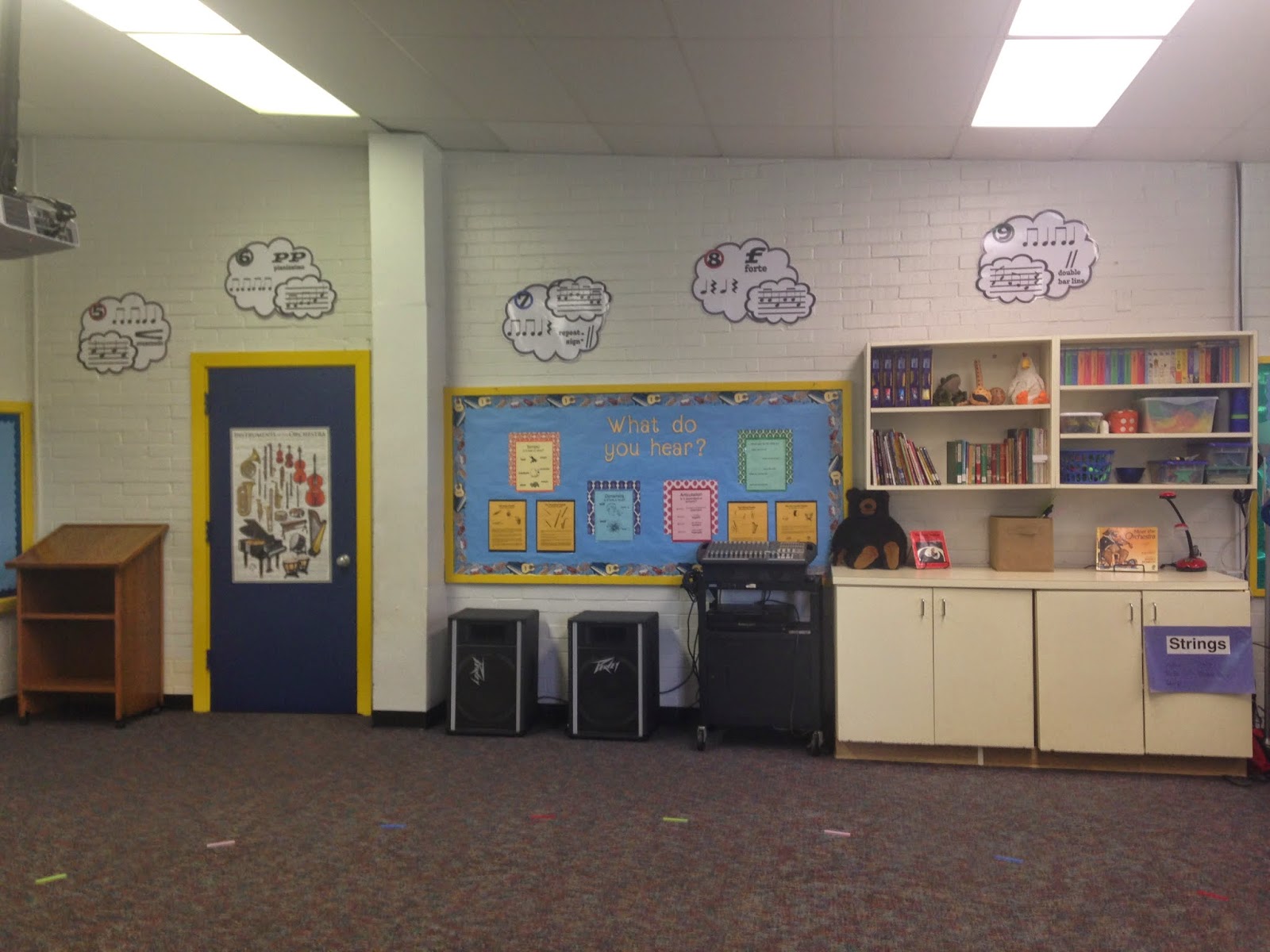
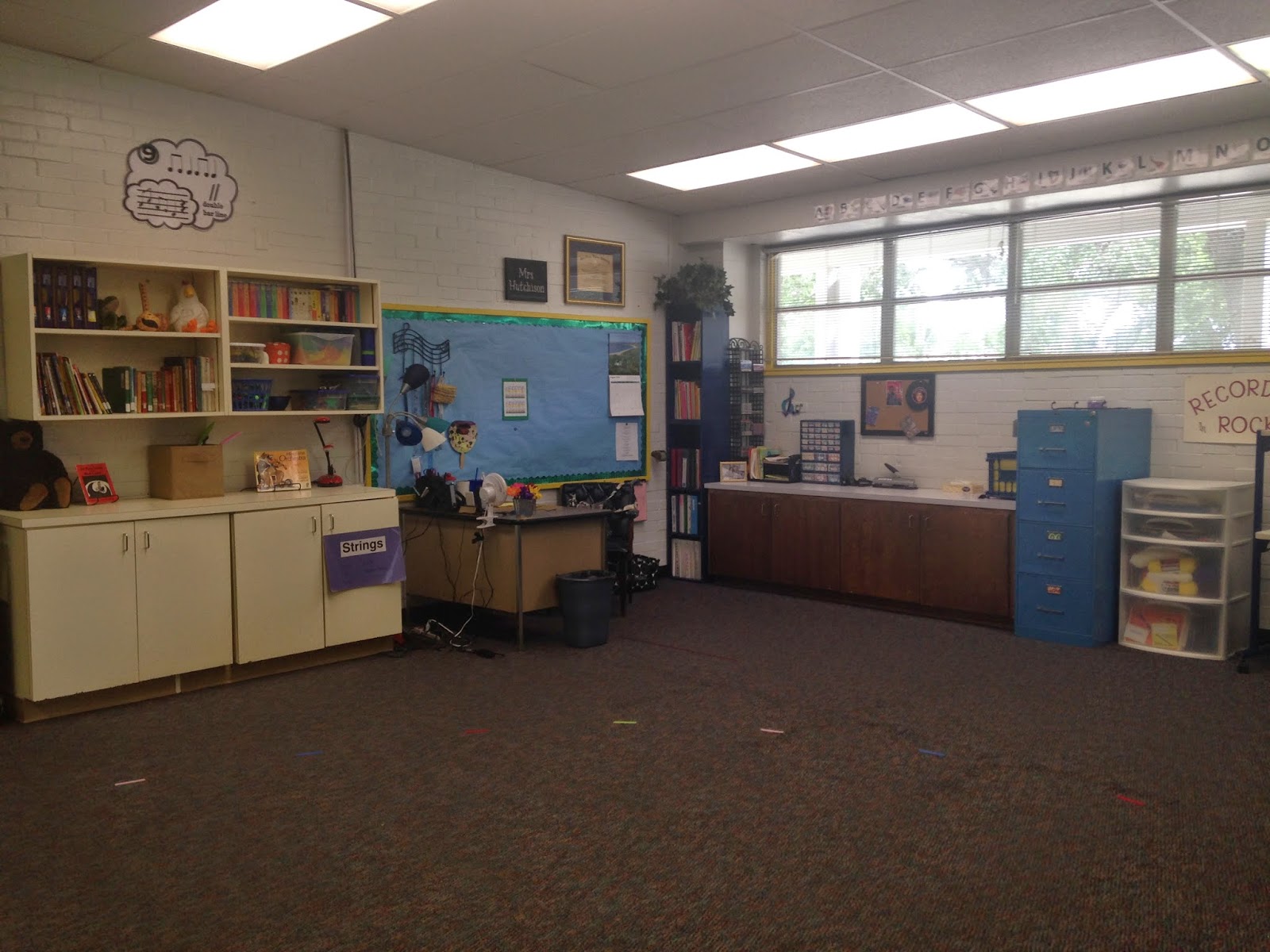
I've said it before, and I'll say it again. It is a special calling to work with middle school/junior high kids.  And I don't have it.  After two (long, stressful, anxiety-inducing) years teaching grades 5-8 music and choir, I am finally back in my element--Elementary, baby!  These are my people.  We love the babies.  Hugs, notes, pictures, cute bulletin boards, and even shoe-tying and nose-wiping.  Okay, maybe not that last one.  But I am SO HAPPY to be back with the littles!  I am giddy with excitement, and I've spent the last two weeks organizing and decorating my new classroom.  It is an old building--my husband had elementary music in the SAME ROOM many moons ago--but I've taken the blue doors and electric yellow trim and turned it into my happy home away from home.  Here it is!


All my storage is in wooden cabinets.  The doors are not very attractive, but I'm gradually adding to them. 


Pocket chart ready for rhythm/melody cards, a spot for objectives (a.k.a. "What are we doing today?"), white board/projector screen, Who's Next Board.  


I think I'm going to like the cabinets and shelf here.  I keep all of my manipulatives, books, and toys/props readily available here.  And the clouds.  They are my new favorite thing.  I found them on Pinterest and downloaded them from this music teacher blog,  Rhythm and Glues. 


My teacher's corner.  Love. Complete with my very own teacher toolbox. 


It's hard to see, but I used colored velcro to mark sit spots on the floor.  I found colored velcro in 36'' pieces at Hobby Lobby this year for just $1.49! 


This is a shortcut version of my guided listening word wall, first introduced HERE. Hopefully one day I can upgrade to the original version, but this works for now. 


Just a closeup of the cuteness inspired by Rhythm and Glues. 


All ready to post objectives for the first week! 

That's it!  My new happy music home.  I am looking forward to a great year of singing, playing, dancing, and loving on my kiddos.  I hope your year is off to a great start as well.  Remember to take care of yourself, eat well, drink lots of water, and take your vitamins.  When I feel good, I am a better teacher/wife/mom/friend/person.  So go to bed early, and get ready to change the world, one song at a time.